Showing posts with label flowers. Show all posts

Thursday, March 31, 2022

Welcoming Spring

Back in March 2020 I snapped some pics of a swath of snowdrops. Finally this March I transformed one, using Photoshop and Topaz. Since my original photo was at most mediocre, I began by running the cropped image through Topaz Sharpen AI, but I didn't see a great deal of difference. I especially wanted to bring out the detail in the blossoms, so I used Precision Detail in Topaz Studio. Then I went to Topaz Impressions to create a painterly effect and finished with a Find Edges filter in Photoshop, toning it with a cooling Photo Filter adjustment layer. I added a white border which set off the image, but I still felt it wasn't finished.


For the final composition, I used a technique from one of my Photoshop Awake lessons. The entire image (without the Find Edges layer) was masked out and then selectively painted back in (on the mask) using watercolor brushes. Then the Find Edges layer (blend mode multiply) was put on top. Next I added some watercolor splatters around the edges. And to extend the edges of the image I cloned translucent sections onto the white border. The final touch was a soft border painted with a watercolor brush and blurred.


Snowdrops

 Working on a flower image in Photoshop is always a delight, and I did enjoy creating this.

Monday, December 31, 2018

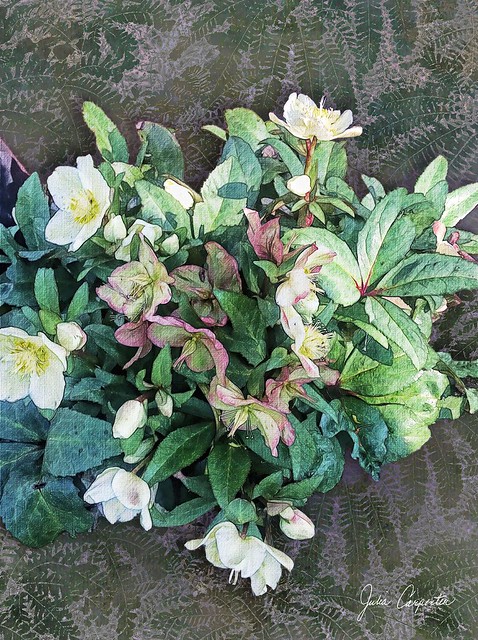
Hellebores

Hellebores
Our city lot is generously shaded by large trees, so I'm always on the lookout for plants that thrive in shade and in our North Texas soil and climate. Hellebores fit the bill, although, alas, they are both slow-growing and a bit pricey. You can't just plant a few and expect them to spread. There are, however, enviable swaths of them at the Dallas Arboretum where I snapped the original photo.
 
One of my Christmas presents (from me to me) was Topaz ReMask, a masking plug-in for Photoshop, so I tried it out on the hellebore image with great success. I played around with just the hellebores on a transparent background, using two other Topaz plug-ins, Adjust and Simplify on separate copies, then Akvis Sketch on another copy. I also enhanced the pinks with a Selective Color adjustment layer.

The background consists of soft, cloudy neutrals on one layer, a deep purple layer over that and two copies of a photo of ferns, one filtered with Topaz Simplify and one with Akvis Sketch. The real magic happens with the blending modes, and there are so many possibilities producing such different effects that I often find it difficult to decide which looks best. (And also find it difficult to stop tweaking.) I finally went with this result which I think makes the ferns look as if stamped or printed on a slightly metallic surface, and they ground the hellebores without distracting from them. There are also a few light touches of gold on top on the background image.

It's been a while since I've done anything “creative” in Photoshop. Because isn't it easy to put aside unessential pursuits for things that “need” to be done. But the satisfaction and pleasure that comes from those pursuits indicate that they are indeed essential, even if the world (or Flickr) isn't breathlessly awaiting another of my oeuvres.

Tuesday, April 22, 2014

At the Arboretum

Diligent I have not been where this blog is concerned. I repeat the modern mantra: too much to do. Although I am luckily, happily, eagerly doing exactly what I want. I am also lucky to live close enough to the Dallas Arboretum to make it an easy destination for an afternoon stroll. Or sometimes Mr. C and I grab a little picnic to take along, which we did on the day I snapped these photos. Then we feasted on all this glorious spring color.  Its uplifting beauty reminds me of a line from a poem by Edna St. Vincent Millay: "O world, I cannot hold thee close enough!"